
macOS使用brew安装Hadoop
前言
通常我一直在虚拟机中安装Hadoop、Hive、Hbase等大数据相关的组件,但随着我的笔记本使用年限越爱越长,性能也下降的很快,已经达到开虚拟机就会开的地步,于是我就考虑直接将Hadoop安装到macOS上,避免了虚拟机对资源的消耗,为了更好的管理,我选择使用brew来安装。
安装Hadoop
使用brew安装Hadoop非常方便,执行如下命令即可:
1 | brew install hadoop |
安装前建议提前安装好JDK,并且配置JAVA_HOME。
为了方便使用,我还配置了hosts
1 | sudo vim /etc/hosts |
配置Hadoop
配置免密登录
macOS默认是关闭了远程登入的功能,所以需要先打开它。打开系统偏好设置 -> 共享,左边勾选远程登录,右边选择仅这些用户,并且把当前用户添加进去。
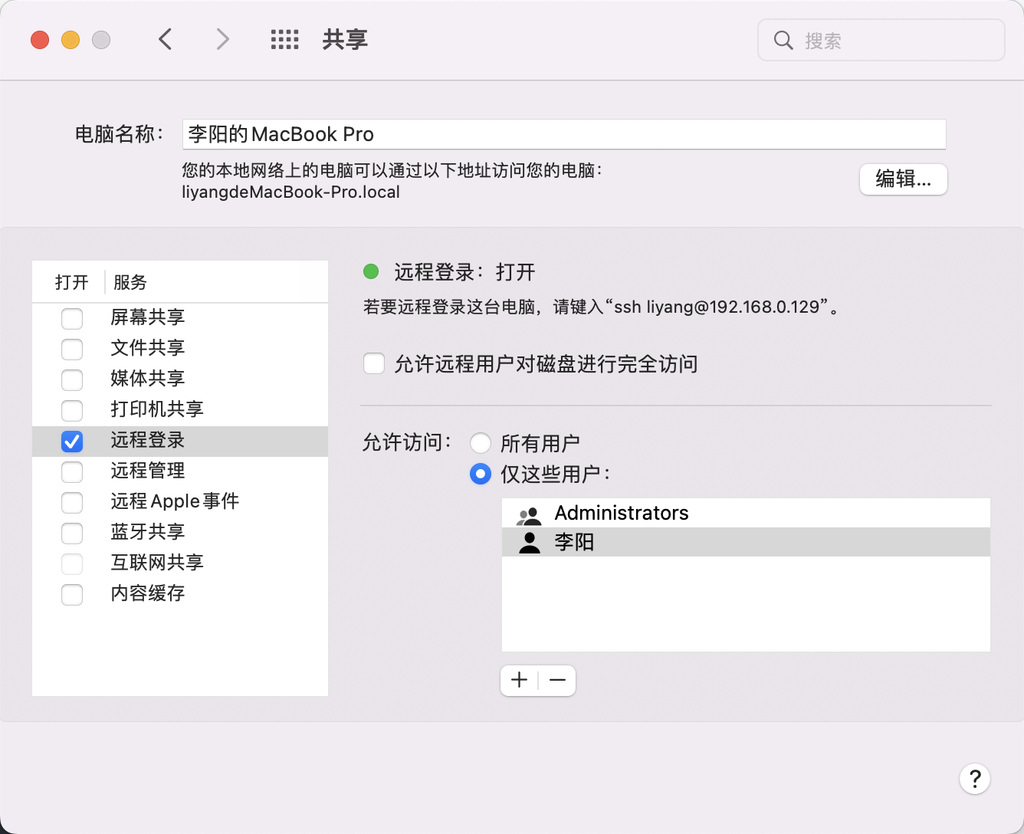
然后生成秘钥和公钥
1 | # 生成公钥和私钥 |
修改Hadoop配置文件
brew安装在/usr/local/Cellar/hadoop/3.3.4。
修改hadoop-env.sh
1 | vim /usr/local/Cellar/hadoop/3.3.4/libexec/etc/hadoop/hadoop-env.sh |
修改core-site.xml
1 | vim /usr/local/Cellar/hadoop/3.3.4/libexec/etc/hadoop/core-site.xml |
填入如下内容:
1 | <configuration> |
修改hdfs-site.xml
1 | vim /usr/local/Cellar/hadoop/3.3.4/libexec/etc/hadoop/hdfs-site.xml |
填入如下内容:
1 | <configuration> |
修改mapred-site.xml
1 | vim /usr/local/Cellar/hadoop/3.3.4/libexec/etc/hadoop/mapred-site.xml |
填写如下内容:
1 | <configuration> |
修改yarn-site.xml
1 | vim /usr/local/Cellar/hadoop/3.3.4/libexec/etc/hadoop/yarn-site.xml |
填写如下内容:
1 | <configuration> |
修改workers
1 | vim /usr/local/Cellar/hadoop/3.3.4/libexec/etc/hadoop/workers |
创建目录
1 | mkdir -p /Users/liyang/Documents/hadoop |
启动Hadoop
设置环境变量
1 | vim ~/.zshrc |
格式化HDFS
1 | hdfs namenode -format |
启动所有服务
1 | # 如果start-all提示不存在的命令,那可能是你环境变量没配置,或者配置了没生效。 |
会输出如下:
1 | (base) ➜ ~ start-all.sh |
访问 web address查看状态
NameNode: http://localhost:9870
ResourceManager: http://localhost:8088/cluster
NodeManager: http://localhost:8042/node
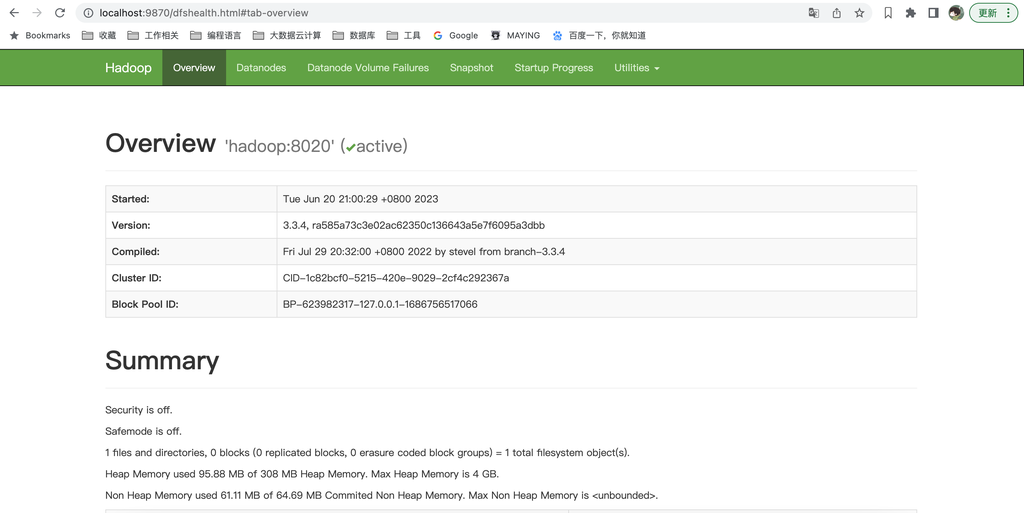
执行命令测试是否正常
1 | (base) ➜ ~ hadoop fs -ls / |
这里会输出大量的WARN,表示没有加载本地库,这个解决办法可参考如下:
https://www.cnblogs.com/shoufeng/p/14940245.html
我选择了修改日志,本来只是为了学习使用,没必要追求这些性能。
本博客所有文章除特别声明外,均采用 CC BY-NC-SA 4.0 许可协议。转载请注明来源 码农笔记!
 wechat
 alipay
相关推荐

2023-06-14
macOS安装Hadoop提示operation not permitted
背景最近重新复习下大数据相关的知识,于是就决定在mbp上安装一套大数据服务(Hadoop、Hive、Spark),使用brew比较简单,很容易就安装好了,按时启动的时候出现了如下错误: 12345678910111213141516171819202023-06-14 23:24:03,271 INFO org.apache.hadoop.hdfs.server.common.Storage: Lock on /Users/liyang/Documents/hadoop/tmp/dfs/name/in_use.lock acquired by nodename 26147@liyangdeMacBook-Pro.local2023-06-14 23:24:03,275 WARN org.apache.hadoop.hdfs.server.namenode.FSNamesystem: Encountered exception loading fsimagejava.io.FileNotFoundException: /Users/liyang/Documents/hadoop/t...
2017-07-21
查看修复HDFS中丢失的块
检测缺失块1hdfs fsck -list-corruptfileblocks 1hdfs fsck / | egrep -v '^\.+$' | grep -v eplica 查看上面某一个文件的情况 1hdfs fsck /path/to/corrupt/file -locations -blocks -files 解决方法如果文件不重要,可以直接删除此文件;或删除后重新复制一份到集群中如果不能删除,需要从上面命令中找到发生在哪台机器上,然后到此机器上查看日志。 参考 http://centoshowtos.org/hadoop/fix-corrupt-blocks-on-hdfs/ http://stackoverflow.com/questions/19205057/how-to-fix-corrupt-hadoop-hdfs
2023-06-20
Kerberos认证后访问HDFS提示Not attempting to re-login错误
场景CDH6.3.4集群,开通了Kerberos认证,在客户端得机器上已经通过了Kerberos得认证并且缓存了票据。 由于是新装的系统,安装了最新的jdk-8u371。 报错执行hdfs dfs -ls / 命令频繁的打印如下错误: 1org.apache.hadoop.security.UserGroupInformation Not attempting to re-login since the last re-login was attempted less than 600 seconds before 错误原因找了很久,忽然想到了曾经遇到过这种问题,是JDK版本太低导致的,但我安装了最新的JDK1.8,那就有可能是JDK版本太高导致的。 解决办法下载了一个jdk-8u221版本,完美解决问题。CDH虽然写了支持JDK1.8,但小版本也会影响到它的正常运行,所以以后遇到类似得情况先调整下JDK版本,别太高也别太低。最好是看下官方有没有推荐的版本。

2023-05-01
macOS和Windows解决Navicat Premium14天试用的办法
Navicat Premium是个好东西,但价格相当贵,我买过Navicat MySQL,整整1000多,还是折扣买的。因为只买了mac版本,Windows用不了,所以我找到了白嫖的办法,仅作为学习使用。 macOS新建一个脚本,resetnavicat.sh 123456789101112# copy from https://github.com/pretend-m/navicat_for_mac_resetrm -rf ~/Library/Preferences/com.navicat.NavicatPremium.plistregex="\.([0-9A-Z]{32})"[[ $(ls -a ~/Library/Application\ Support/PremiumSoft\ CyberTech/Navicat\ CC/Navicat\ Premium/ grep '^\.') =~ $regex ]]hash=${BASH_REMATCH[1]}if [ ! -z $hash ]; th...

2018-01-23
macOS 卸载Python3
由于刚入手mac后,习惯于dmp文件去安装软件,包括python3,两年过去了,python3也已经更新了好几个版本,更新起来也较为麻烦,于是就考虑使用brew去统一管理吧。 查看Python3的位置12which python3/Library/Frameworks/Python.framework/Versions/3.5/bin/python3 或者 123where python3/Library/Frameworks/Python.framework/Versions/3.5/bin/python3/usr/local/bin/python3 卸载Python3删除框架1sudo rm -rf /Library/Frameworks/Python.framework/Versions/x.x x.x代表你的版本,比如我的是3.5 删除应用目录1sudo rm -rf "/Applications/Python x.x" 或者直接从Finder -> 应用程序 ,找到Python,点击右键,删除! 删除指向 Python 的连接12cd /us...
2018-05-21
Hadoop Timed out waiting 20000ms
今天发现测试环境Hadoop集群开始频繁宕掉,查看namenode日志发现有如下报错信息: 1java.io.IOException: Timed out waiting 20000ms for a quorum of nodes to respond. 原因是因为namenode与journalnode通信时,超过20000ms,触发了默认设置的超时时长,解决办法:在hdfs-site.xml中加入如下配置 123456789101112<property> <name>dfs.qjournal.start-segment.timeout.ms</name> <value>90000</value></property><property> <name>dfs.qjournal.select-input-streams.timeout.ms</name> <value>90000</value></property&...
评论
WalineDisqus